
Jump to content
View in the app

A better way to browse. Learn more.

FGX Native

A full-screen app on your home screen with push notifications, badges and more.

To install this app on iOS and iPadOS
  1. Tap the Share icon in Safari
  2. Scroll the menu and tap Add to Home Screen.
  3. Tap Add in the top-right corner.
To install this app on Android
  1. Tap the 3-dot menu (⋮) in the top-right corner of the browser.
  2. Tap Add to Home screen or Install app.
  3. Confirm by tapping Install.

В ближайшем релизе 1.1.4.0 появится возможность указывать форматированный текст, используя упрощенный HTML формат.

Чтобы использовать форматированный текст необходимо:

1. Указать в свойстве Text HTML разметку.

Например: 

<font color='red'>red</font> <b>and</b> <font color='blue'>blue</font>

Внимание! Поддерживается только форматирование текста, такое как изменение цвета и стиля текста.

2. Указать, что нужно воспринимать исходный текст, как HTML разметка (TextType = HTML).

image.png

Внимание! В версии 1.1.4.0 TfgLabel не поддерживает отображение html в дизайнере IDE.
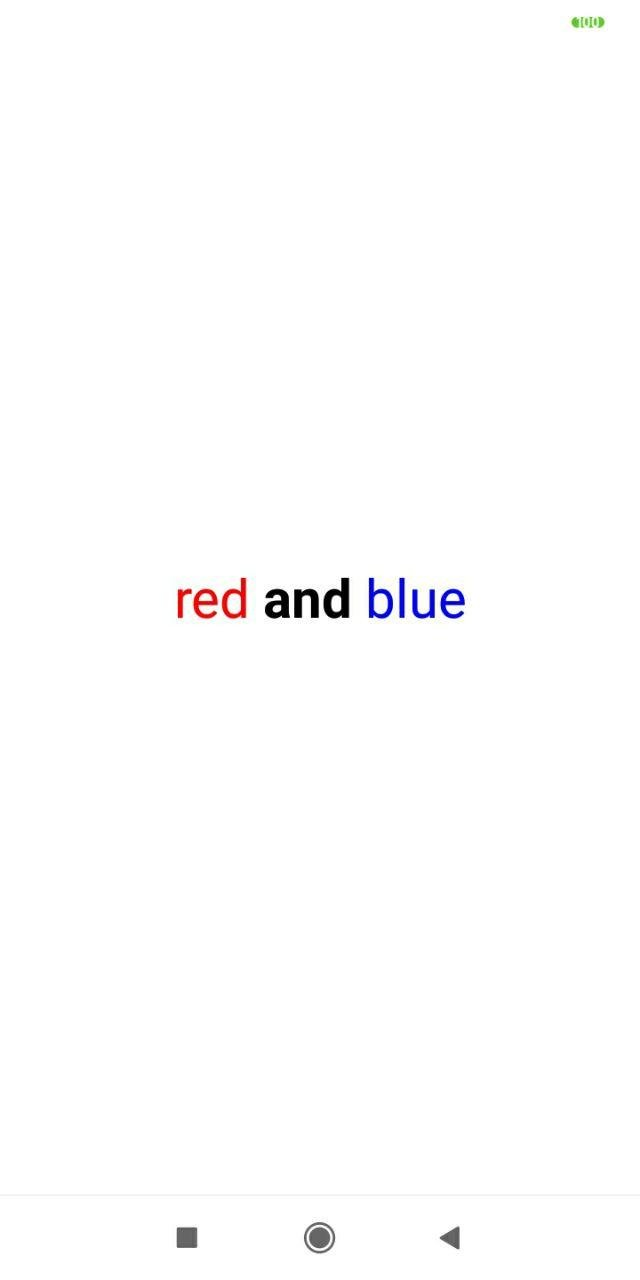
image.png

0 Comments

Recommended Comments

There are no comments to display.

Recently Browsing 0

  • No registered users viewing this page.

Configure browser push notifications

Chrome (Android)
  1. Tap the lock icon next to the address bar.
  2. Tap Permissions → Notifications.
  3. Adjust your preference.
Chrome (Desktop)
  1. Click the padlock icon in the address bar.
  2. Select Site settings.
  3. Find Notifications and adjust your preference.
