Tomaz
Members
-
Joined
-
Last visited
-
Hi Is it possible to install one paid version on two computers? best regards, Tomaz
-
Hi I want to have vertical scroll on form so you have more TfgEdit field that fit the screen . What is the "correct" way to do it? Right now i have created TfgCollectionView with 1 row and i have put labels and fields in one TfgCollectionViewStyle. Its working, but i am not sure this is the best way to do it. Any pointer greatly appreciated. Thanks, Tomaz
-
Thank you. I will probably have more newbie questions.
-
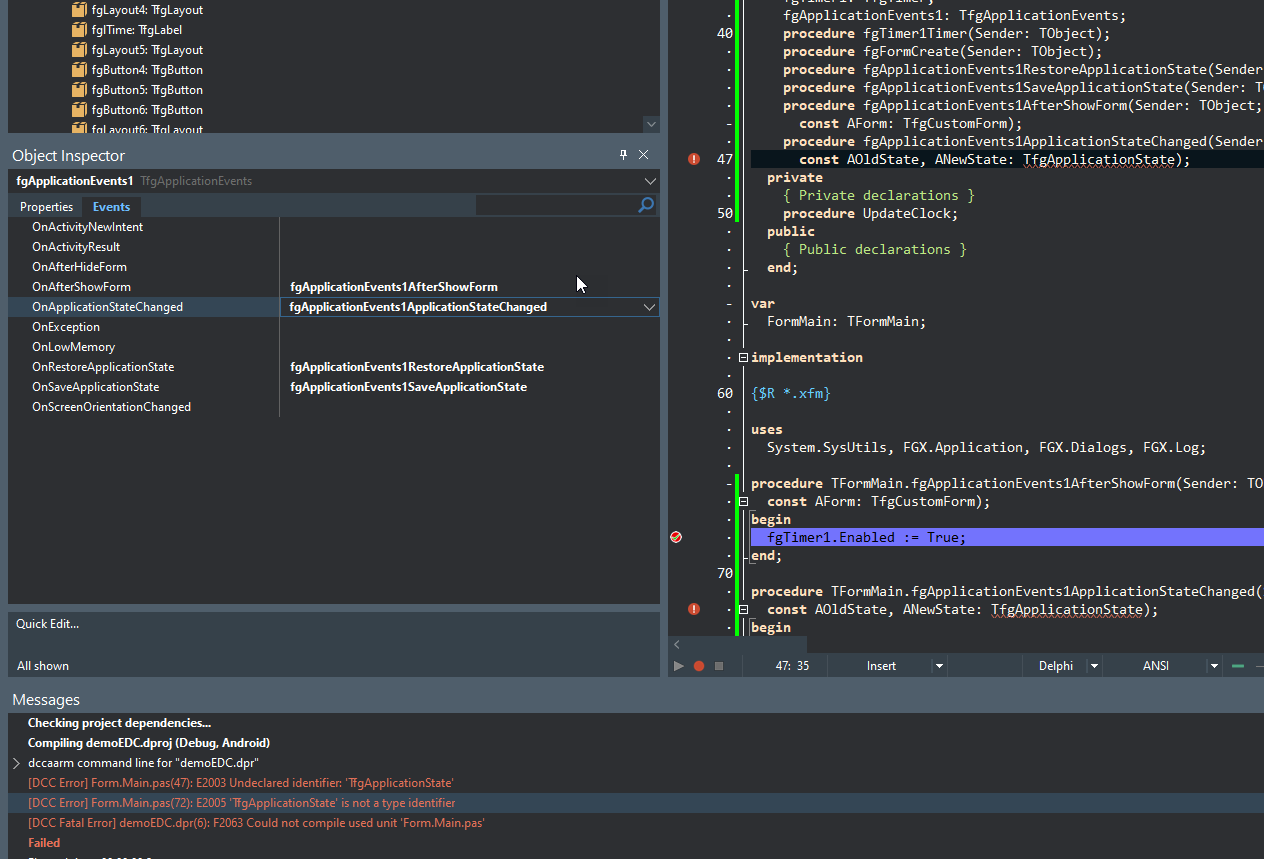
Hi On Trial FGX Native in D11.2 for fgApplicationEvents on event OnapplicationStateChange i get this error when compiling if i remove procedure for event it works

-
But nevertheless the FGX looks amazing and i am sure it will work. And hopefully you will get another happy paying customer 🙂
-
No for 1 and Yes for 2 I will try this on older Rio version.
-
Alexandria 11.2
-
Hi I want to test trial version, i get this error. Probably something smaller, but i can't figure it out by myself. any help is apreciated. br, Tomaz [PAClient Error] Error: E2312 Unable to execute '"C:\Users\Public\Documents\Embarcadero\Studio\22.0\CatalogRepository\AndroidSDK-2525-22.0.46141.0937\build-tools\32.0.0\Aapt.exe" package -f -M "C:\Users\Tomaz\Documents\FGX Native\Samples\Animation - Modal forms\Android64\Debug\AnimationModalFormDemo\AndroidManifest.xml" -F "C:\Users\Tomaz\Documents\FGX Native\Samples\Animation - Modal forms\Android64\Debug\AnimationModalFormDemo\bin\AnimationModalFormDemo-unaligned.apk" -I "C:\Users\Public\Documents\Embarcadero\Studio\22.0\CatalogRepository\AndroidSDK-2525-22.0.46141.0937\platforms\android-32\android.jar" -S "C:\Users\Tomaz\Documents\FGX Native\Samples\Animation - Modal forms\Android64\Debug\AnimationModalFormDemo\res" -A "C:\Users\Tomaz\Documents\FGX Native\Samples\Animation - Modal forms\Android64\Debug\AnimationModalFormDemo\assets" "C:\Users\Tomaz\Documents\FGX Native\Samples\Animation - Modal forms\Android64\Debug\AnimationModalFormDemo\library" "C:\Users\Tomaz\Documents\FGX Native\Samples\Animation - Modal forms\Android64\Debug\AnimationModalFormDemo\classes"' (Error 1) [PAClient Error] Error: E2312 C:\Users\Tomaz\Documents\FGX Native\Samples\Animation - Modal forms\Android64\Debug\AnimationModalFormDemo\AndroidManifest.xml:23: error: Error: No resource found that matches the given name (at 'icon' with value '@mipmap/ic_launcher'). [PAClient Error] Error: E2312 C:\Users\Tomaz\Documents\FGX Native\Samples\Animation - Modal forms\Android64\Debug\AnimationModalFormDemo\AndroidManifest.xml:23: error: Error: No resource found that matches the given name (at 'theme' with value '@style/AppTheme').