Yaroslav Brovin
Administrators
-
Joined
-
Last visited
Everything posted by Yaroslav Brovin
-
-
-
-
Download: RAD Studio 12.*-13.0 setup_1.20.2.0_release.eng.zip Release date: 22 September 2026 New ✨Project OptionsThe settings page for the main Android app icon has been added. You can set an adaptive icon, as well as use old icons with the ability to automatically generate them from SVG. All of our demos now use the new adaptive app icon and animated splash screen on modern Android versions. FormsAdded a new manual animation mode for displaying and hiding forms. In manual mode, the developer is fully responsible for animating the opening and closing of the form. This mode can be useful for those who don't like the standard animation methods. To use it, you need to pass the new value of the TfgFormPresentationStyle.Custom modes for regular or TfgModalFormPresentationStyle.Custom for the modal mode. In this mode, the request to animate the form is made through a new event TfgForm.OnCustomAnimation. A special handler AHandler is passed to the event through which it is necessary to inform the form about the completion of its animation by calling the AHandler.Completed method. Calling this method is required for correct work. If there is no notification, the user animation will be considered prematurely completed. uses FGX.Animation, FGX.Animation.Types, FGX.Animation.Templates, FGX.Asserts; procedure TFormSecond.fgFormCustomAnimation(Sender: TObject; const AKind: TfgCustomFormAnimationKind; const AHandler: IFGXFormAnimationCompletionHandler); var FinishAnimationCallback: TfgCallback; begin FinishAnimationCallback := procedure begin AHandler.Completed; end; case AKind of TfgCustomFormAnimationKind.Show: FadeIn(TfgFadeAnimationParams.Default .RemoveOption(TfgAnimationOption.StartFromCurrent), FinishAnimationCallback); TfgCustomFormAnimationKind.ShowModal: FadeInFromTop(TfgFadeAnimationParams.Default .RemoveOption(TfgAnimationOption.StartFromCurrent), FinishAnimationCallback); TfgCustomFormAnimationKind.Hide: FadeOut(FinishAnimationCallback); TfgCustomFormAnimationKind.HideModal: FadeOutToTop(FinishAnimationCallback); else raise EfgAssertError.CreateFmt(SUnknownValue, ['TfgCustomFormAnimationKind']); end; end;Added a new example: "Animation" -> "Custom animation of opening/closing a form" Improvements 🙌SVGImproved parsing of SVG files: Improved reading of transparency attributes. Fixed reading gradients if names use characters in different registers. TfgAudioRecorderAdded a new property TfgAudioRecorder.BitRate, which allows you to specify the desired bitrate value. Fixed minor bugs in the demo example: "Services" -> "Audio" -> "Audio Recording" Animated splash screen for the AndroidAll demo examples have been updated. Now they use our an animated splash screen on Android 12+ versions. TfgListMenuNow you can hide menu items and disable then for interaction. Added new TfgListMenu properties: Visible and Enabled. FGX-523 Add Visible and Enabled property for TfgListMenu items. Radial gradientThe method of setting the radial gradient has been revised. Previously, the center of the gradient coincided with the center of the StartPoint/EndPoint segment, and the radius was always equal to half the maximum size of the shape being filled in. As a result, it was difficult to change the standard gradient layout. Now the radial gradient is set as follows: TfgGradient.StartPoint sets the center of the radial gradient TfgGradient.StopPoint indicates the radius relative to the center. Using this approach, you can now set any location of the gradient and its size. In addition, the display of the radial gradient in the shape designer has been fixed. Bug Fixes 🐛FGX-516 Incorret work of Radial Gradient. FGX-518 EAccessViolation when a form is hidden manually and closed afterwards (iOS). FGX-519 The CollectionViewTextAutoHeight sample doesn't work (iOS). FGX-520 `TfgLabel` does not work in `TextType=HTML` mode (Android). The background set via TfgLabel.BackgroundName might not be displayed in iOS (iOS). Sending a local notification via TNotificationCenter could result in receiving a push notification from TfgPushNotificationService. Fixed a demo example with sending a local notification. In case of an HTML parsing error, TfgLabel now displays plain text in the designer, just as it does on devices. When editing general app information via the settings dialog, some settings could be lost upon saving. On Android 16+, the virtual keyboard could always return the status "Shown" even if it wasn't (Android). Improved stability of assets when they are deleted.
-
Скачать: RAD Studio 12.* - 13.0 setup_1.20.2.0_release.rus.zip Дата релиза: 21 октября 2026 Новое ✨Настройки проектаДобавлена страница настройки основной иконки приложения для Android. Доступно, как задание адаптивной иконки, так и использование старых иконок с возможностью автоматической их генерации их из SVG. Все наши демонстрационные примере теперь используют новую адаптивную иконку приложения и анимированную заставка на современных Android версиях. ФормыДобавлен новый ручной режим анимации отображения и скрытия формы. В ручном режиме разработчик полностью отвечает за анимацию открытия и закрытия формы. Этот режим может пригодиться тем, кому не подходят стандартные способы анимаций. Чтобы им воспользоваться нужно передать новое значение режимов TfgFormPresentationStyle.Custom для обычного или TfgModalFormPresentationStyle.Custom для модального режима. В этом режиме запрос на анимацию формы осуществляется через новое событие TfgForm.OnCustomAnimation. В событие передается специальный обработчик AHandler через который необходимо сообщить форме о завершении своей анимации, вызвав метод AHandler.Completed. Вызов этого метода обязателен для корректной работы. Если уведомления не будет, то пользовательская анимация будет считаться досрочно законченной. uses FGX.Animation, FGX.Animation.Types, FGX.Animation.Templates, FGX.Asserts; procedure TFormSecond.fgFormCustomAnimation(Sender: TObject; const AKind: TfgCustomFormAnimationKind; const AHandler: IFGXFormAnimationCompletionHandler); var FinishAnimationCallback: TfgCallback; begin FinishAnimationCallback := procedure begin AHandler.Completed; end; case AKind of TfgCustomFormAnimationKind.Show: FadeIn(TfgFadeAnimationParams.Default .RemoveOption(TfgAnimationOption.StartFromCurrent), FinishAnimationCallback); TfgCustomFormAnimationKind.ShowModal: FadeInFromTop(TfgFadeAnimationParams.Default .RemoveOption(TfgAnimationOption.StartFromCurrent), FinishAnimationCallback); TfgCustomFormAnimationKind.Hide: FadeOut(FinishAnimationCallback); TfgCustomFormAnimationKind.HideModal: FadeOutToTop(FinishAnimationCallback); else raise EfgAssertError.CreateFmt(SUnknownValue, ['TfgCustomFormAnimationKind']); end; end;Добавлен новый пример: "Анимация" -> "Пользовательская анимация открытия/закрытия формы" Улучшения 🙌SVGУлучшен разбор SVG файлов: Улучшено чтение атрибутов прозрачности. Исправлено чтения градиентов, если в именах используются символы в разных регистрах. TfgAudioRecorderДобавлено новое свойство TfgAudioRecorder.BitRate, позволяющее указывать желаемое значение битрейта. Исправлены небольшие недочеты демонстрационного примера: "Сервисы" -> "Аудио" -> "Запись звука" Анимированная заставка для androidОбновлены все демонстрационные примеры. Теперь они используют анимированную заставку на Андроид 12+ версиях. TfgListMenuТеперь можно скрывать пункты меню и делать их недоступными для взаимодействия. Добавлены новые свойства TfgListMenu: Visible и Enabled. FGX-523 Add Visible and Enabled property for TfgListMenu items. Радиальный градиентаПересмотрен способ задания радиального градиента. Раньше центр градиента совпадал с центром отрезка StartPoint/EndPoint, а радиус всегда был равен половине максимального размера закраиваемой фигуры. В результате чего было сложно поменять стандартное расположение градиента. Теперь радиальный градиент задается следующим образом: TfgGradient.StartPoint задает центр радиального градиента TfgGradient.StopPoint указывает на радиус относительно центра. Используя такой подход, теперь можно задать любое расположение градиента и его размер. Помимо этого исправлено отображение радиального градиента в дизайнере форм. Исправление ошибок 🐛FGX-516 Некорректная работа радиального градиента. FGX-518 EAccessViolation when a form is hidden manually and closed afterwards (iOS). FGX-519 Перестал работать пример CollectionViewTextAutoHeight под IOS (iOS). FGX-520 `TfgLabel` в режиме `TextType=HTML` не работает (Android). Фон заданный через TfgLabel.BackgroundName мог не отображаться в iOS (iOS). Отправка локального уведомления через TNotificationCenter могла заканчиваться срабатыванием приема пуш уведомления у TfgPushNotificationService. Исправлен демонстративный пример с отправкой локального уведомления. В случае ошибки разбора html текста TfgLabel в дизайнере теперь показывается plain text, как и на устройствах. При редактировании основной информации о приложении через диалог настроек часть настроек могла теряться при сохранении. На Android 16+ виртуальная клавиатура могла всегда возвращать статус "Показана" даже, если это не так (Android). Повышена стабильность работы ресурсов при их удалении.
-
Планируем на неделе выпустить релиз
-
Changed Status to Fixed Changed Resolution to Fixed Changed Fix version to 1.20.2.0
-
Changed Status to Fixed Changed Resolution to Fixed Changed Fix version to 1.20.2.0
-
There are no possible hide item from TfgListMenu component. Please provide new properties Visible and Enabled for TfgListMenuItem.
-
Changed Status to Open
-
Hello @Stefan Diestelmann , Could you attach demo sample for reproduce issue? Thank you
-
Also We have added custom animation for forms in 1.20.2.0. So if you would like to apply your own animation you can do it without any workarounds.
-
Changed Status to Fixed Changed Resolution to Fixed Changed Fix version to 1.20.2.0
-
-
Changed Status to Fixed Changed Resolution to Fixed Changed Fix version to 1.20.2.0
-
Выслал вам в личных сообщения исправление.
-
Любопытно. Вот мое видео на Андроид 16 с двумя разными вариантами системной нижней панелью: жесты и системные кнопки: В обоих случайх работает, как ожидается. XRecorder_20261008_01.mp4XRecorder_20261008_02.mp4А какое значение прямоугольника клавиатуры возвращается в событии: TfgForm.OnVirtualKeyboardFrameChanged?
-
Changed Status to Open
-
Проверил, ошибку не смог воспроизвести. Есть демо-проект?
-
Добрый день, проверю, отпишусь.
-
-
Hello, Could you attach your sample? Thank you
-
Changed Status to Open
-
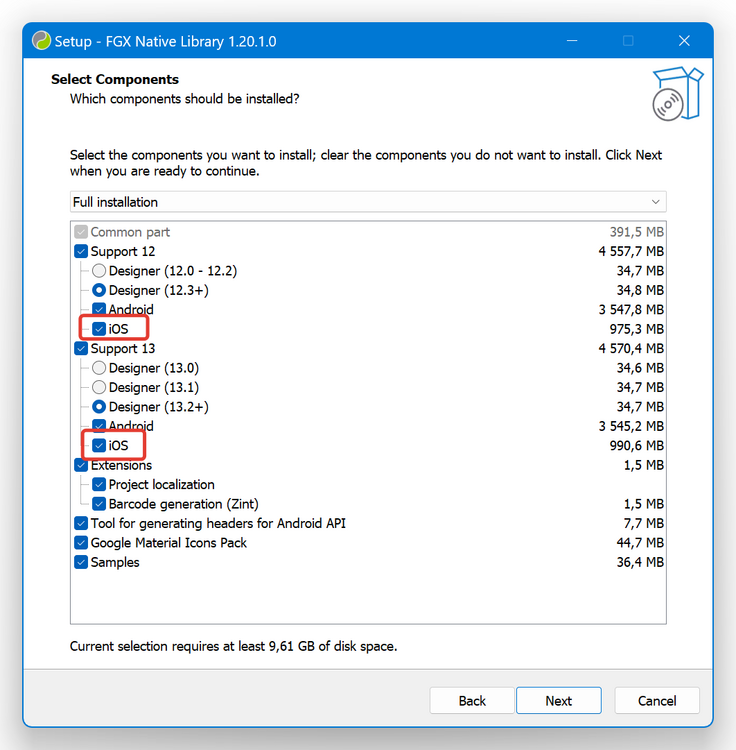
Hello, You should check: Paths in IDE Tools -> Options... -> Language -> Delphi -> Library -> iOS Device 64-bit -> Library path. It has to contains paths to FGX Native dcu binary files for iOS SImulator target. If you have specified paths in (1). So you should check, that you selected iOS target files in installer (when you install FGX Native). Thank you
-