

Leaderboard
-

Yaroslav Brovin
Administrators35Points3,453Posts -
dervish00
Active subscription6Points368Posts -
Ivan Sebekin
Members4Points125Posts -
posmetuhov
Active subscription3Points26Posts



Popular Content
Showing content with the highest reputation since 11/22/2025 in Posts
-
3 pointsСкачать: RAD Studio 12.* - 13.0 setup_1.20.2.0_release.rus.zip Дата релиза: 21 октября 2026 Новое ✨Настройки проектаДобавлена страница настройки основной иконки приложения для Android. Доступно, как задание адаптивной иконки, так и использование старых иконок с возможностью автоматической их генерации их из SVG. Все наши демонстрационные примере теперь используют новую адаптивную иконку приложения и анимированную заставка на современных Android версиях. ФормыДобавлен новый ручной режим анимации отображения и скрытия формы. В ручном режиме разработчик полностью отвечает за анимацию открытия и закрытия формы. Этот режим может пригодиться тем, кому не подходят стандартные способы анимаций. Чтобы им воспользоваться нужно передать новое значение режимов TfgFormPresentationStyle.Custom для обычного или TfgModalFormPresentationStyle.Custom для модального режима. В этом режиме запрос на анимацию формы осуществляется через новое событие TfgForm.OnCustomAnimation. В событие передается специальный обработчик AHandler через который необходимо сообщить форме о завершении своей анимации, вызвав метод AHandler.Completed. Вызов этого метода обязателен для корректной работы. Если уведомления не будет, то пользовательская анимация будет считаться досрочно законченной. uses FGX.Animation, FGX.Animation.Types, FGX.Animation.Templates, FGX.Asserts; procedure TFormSecond.fgFormCustomAnimation(Sender: TObject; const AKind: TfgCustomFormAnimationKind; const AHandler: IFGXFormAnimationCompletionHandler); var FinishAnimationCallback: TfgCallback; begin FinishAnimationCallback := procedure begin AHandler.Completed; end; case AKind of TfgCustomFormAnimationKind.Show: FadeIn(TfgFadeAnimationParams.Default .RemoveOption(TfgAnimationOption.StartFromCurrent), FinishAnimationCallback); TfgCustomFormAnimationKind.ShowModal: FadeInFromTop(TfgFadeAnimationParams.Default .RemoveOption(TfgAnimationOption.StartFromCurrent), FinishAnimationCallback); TfgCustomFormAnimationKind.Hide: FadeOut(FinishAnimationCallback); TfgCustomFormAnimationKind.HideModal: FadeOutToTop(FinishAnimationCallback); else raise EfgAssertError.CreateFmt(SUnknownValue, ['TfgCustomFormAnimationKind']); end; end;Добавлен новый пример: "Анимация" -> "Пользовательская анимация открытия/закрытия формы" Улучшения 🙌SVGУлучшен разбор SVG файлов: Улучшено чтение атрибутов прозрачности. Исправлено чтения градиентов, если в именах используются символы в разных регистрах. TfgAudioRecorderДобавлено новое свойство TfgAudioRecorder.BitRate, позволяющее указывать желаемое значение битрейта. Исправлены небольшие недочеты демонстрационного примера: "Сервисы" -> "Аудио" -> "Запись звука" Анимированная заставка для androidОбновлены все демонстрационные примеры. Теперь они используют анимированную заставку на Андроид 12+ версиях. TfgListMenuТеперь можно скрывать пункты меню и делать их недоступными для взаимодействия. Добавлены новые свойства TfgListMenu: Visible и Enabled. FGX-523 Add Visible and Enabled property for TfgListMenu items. Радиальный градиентаПересмотрен способ задания радиального градиента. Раньше центр градиента совпадал с центром отрезка StartPoint/EndPoint, а радиус всегда был равен половине максимального размера закраиваемой фигуры. В результате чего было сложно поменять стандартное расположение градиента. Теперь радиальный градиент задается следующим образом: TfgGradient.StartPoint задает центр радиального градиента TfgGradient.StopPoint указывает на радиус относительно центра. Используя такой подход, теперь можно задать любое расположение градиента и его размер. Помимо этого исправлено отображение радиального градиента в дизайнере форм. Исправление ошибок 🐛FGX-516 Некорректная работа радиального градиента. FGX-518 EAccessViolation when a form is hidden manually and closed afterwards (iOS). FGX-519 Перестал работать пример CollectionViewTextAutoHeight под IOS (iOS). FGX-520 `TfgLabel` в режиме `TextType=HTML` не работает (Android). Фон заданный через TfgLabel.BackgroundName мог не отображаться в iOS (iOS). Отправка локального уведомления через TNotificationCenter могла заканчиваться срабатыванием приема пуш уведомления у TfgPushNotificationService. Исправлен демонстративный пример с отправкой локального уведомления. В случае ошибки разбора html текста TfgLabel в дизайнере теперь показывается plain text, как и на устройствах. При редактировании основной информации о приложении через диалог настроек часть настроек могла теряться при сохранении. На Android 16+ виртуальная клавиатура могла всегда возвращать статус "Показана" даже, если это не так (Android). Повышена стабильность работы ресурсов при их удалении.3 points
-
3 pointsСкачать: RAD Studio 12.* - 13.0 setup_1.19.6.0_release.rus.zip Дата релиза: 3 июня 2026 Новое ✨TfgWebBrowserДобавлены два новых события: OnPermissonRequest и OnConsoleMessage. Добавлен новый демонстрационный проект: "Компоненты" -> "TfgWebBrowser" -> "Запрос разрешений" Работа с разрешениямиСобытие OnPermissonRequest позволяет управлять доступом веб-браузера к камере, микрофону и приватным медиа данным. Событие вызывается в тот момент, когда загружаемый контент в браузере хочет получить приватный доступ к камере, микрофону или другим ресурсам. На вход события передается набор запрашиваемых ресурсов AResources: TfgPermissionResource = (AudioCapture, VideoCapture, ProtectedMedia); TfgPermissionResources = set of TfgPermissionResource; TfgPermissionRequestEvent = procedure(Sender: TObject; const AUrl: string; const AResources: TfgPermissionResources; const AHandler: IFGXPermissionRequestHandler) of object;AHandler используется для подтверждения или отклонения такого доступа. Вам необходимо в этом событие сделать такой запрос системе, и по получении подтверждения от пользователя сообщить браузеру, что доступ разрешен посредством вызова AHandler.Grant(Resources). Если же никакой доступ не выдан - AHandler.Deny. Обратите внимание, что системные разрешения запрашиваемые через TfgPermissionService.RequestPermissionsAsync выдаются на все ваше приложение. А это значит, что любой компонент и код в рамках вашего приложения автоматически получает доступ. Однако, веб-браузер позволяет подгружать любой контент динамически. И чтобы контент веб браузера не мог следить за пользователем (при условии ранее выданного доступа), он автоматически запрашивает такое разрешение доступа у разработчика через новое событие. Если же разработчик не выдает такой доступ или же не пишет обработчик, такой запрос доступа автоматически считается отклоненным. Также, это событие НЕ запрашивает доступ к камере или микрофону у системы, а лишь позволяет вам заблокировать такой доступ. Если вы одобрите этот доступ в этом событие, но не получите разрешение у системы, то браузер не сможет использовать камеру и микрофон. Данное событие актуально только для платформы Андроид. По сколько iOS автоматически запрашивает такой доступ у пользователя автоматически. КонсольСобытие OnConsoleMessage позволяет перехватить сообщение, выводимое Javascript в консоль веб-браузера. Работает только на Андроид. Улучшения 🙌TfgCollectionViewВ этом релизе изменен подход к динамическому расчету размеров элементов TfgCollectionView. Несмотря на то, что список допускал изменение высот (для вертикально ориентированного списка) элементов, предложенное нами решение не являлось до конца согласованным с тем, как работает список в iOS. Как вы знаете, отображение элементов в TfgCollectionView не зависит от их количества. Потому что всегда отображаются только видимые элементы. Несмотря на то, что принцип работы списка схож в Android и iOS, разница все же есть: В Андроиде вы никогда не узнаете суммарный размер элементов списка (он же ContentSize) и точное смещение содержимого ContentOffset. Чтобы узнать точное смещение списка и размер содержимого, ему пришлось бы вначале загрузить все элементы, чтобы узнать у каждого элемента его реальную высоту. Но для скорости работы в Андроиде это не делается. Поэтому расчет смещения выполняется по среднему значению высот элементов в видимом окне (используется алгоритм скользящего окна). И значит в Андроиде можно безнаказанно менять размер элемента в любой момент времени, потому что это не влияет на расчет смещения и размер содержимого в парадигме работы компонента под Android. В iOS же ситуация полностью противоположная, список первым делом запрашивает размеры у всех элементов и только потом их выводит. Поэтому любое изменение размера элементов уже после того, как список запросил все размеры и провел все тяжелые вычисления, приводит к очень сложной актуализации внутреннего состояния списка с дальнейшими проблемами в скорости работы. Начиная с iOS 26 любая такая попытка изменения размера заканчивается падением приложения, потому что нативная реализация списка это не учитывает. Поэтому нам пришлось переосмыслить подход к динамическому расчету высот элементов: Если вы планируете менять высоту элементов динамически, то теперь необходимо явно об этом указать списку, установив значение нового свойства TfgCollectionViewStyle.VariableSize = True. По умолчанию, значение равно False. Если этого не сделать, то установленный размер элементов в OnBindItem будет проигнорирован и будет использован размер стиля, взятый из дизайнера. Как и ранее, расчет высоты элементов необходимо осуществлять в TfgCollectionView.OnBindItem. Указанная высота кешируется в списке и используется для ускорения работы списка. При изменении размера списка, а также при вызове ReloadItems и других аналогичных методов, кеш автоматически сбрасывается и вам будет предложено повторно пересчитать размеры элементов в TfgCollectionView.OnBindItem. Если по каким-то причинам, вы хотите пересчитать размер элемента, то вам необходимо сообщить списку об этом по средством вызова методов ReloadItems, ReloadItem. Если этого не сделать, то любая попытка задать новый размер, который будет отличаться от первоначального, будет проигнорирована списком. Рассмотрим пример. У нас есть простой список с элементами, отображаемыми надпись при помощи единственного компонента стиля TfgLabel (text). Тогда вспомогательный метод, выполняющий расчет высоты метки при фиксированной ширине может выглядеть так: procedure TFormMain.AdjustHeight(const AItem: TfgItemWrapper); begin var LLabel := AItem.GetControlByLookupName<TfgLabel>('text'); if LLabel = nil then Exit; var Item := AItem.Item; // Выполняем расчет доступной ширины метки для вывода текста с учетом внешних и внутренних отступов var TotalHItemPadding := Item.Padding.LeftRtl + Item.Padding.RightRtl; var TotalHLabelMargins := LLabel.Margins.LeftRtl + LLabel.Margins.RightRtl; var TotalVLabelMargins := LLabel.Margins.Top + LLabel.Margins.Bottom; var ContentWidth := Item.Width - TotalHItemPadding - TotalHLabelMargins; // Выполняем расчет размера метки для отображения текста с учетом фиксированной ширины. var Sz := LLabel.MeasureSize(TfgMeasuringSpecification.Fixed, ContentWidth, TfgMeasuringSpecification.Unspecified, 0); Item.Height := Sz.Height + TotalVLabelMargins; end;Тогда связывание элементов с данными и задание размера будет выглядеть так: procedure TFormMain.cvListBindItem(Sender: TObject; const AIndex: Integer; const AStyle: string; const AItem: TfgItemWrapper); var ItemText: string; begin ItemText := FItems[AIndex]; var LLabel := AItem.GetControlByLookupName<TfgLabel>('text'); if LLabel <> nil then LLabel.Text := ItemText; AdjustHeight(AItem); end;Так же не забываем, что для стиля нужно указать TfgCollectionViewStyle.VariableSize = True. TfgNavigationBarРасширены настройки отображения иконки кнопок ActionButtons. Для кнопки TfgNavigationBarButton введено новой свойство Icon, отвечающее за настройку отображения иконки на кнопке. Теперь доступны следующие настройки: RenderMode - отвечает за нужно ли перекрашивать иконку в заданный оттенок или выводить иконку, как она есть. TintColor/TintColorName - цвет оттенка иконки. Позволяет переопределить оттенок иконки, заданный через свойство TfgNavigationBar.ButtonsOptions.IconTintColor/IconTintColorName по умолчанию. TfgLabelУнифицирован парсер HTML TfgLabel для всех платформ. Для режима TfgLabel.TextType = TfgTextType.HTML добавлено отображение текста дизайнере. Добавлен многострочный редактор текста TfgLabel.Text при редактировании в инспекторе объектов. Исправление ошибок 🐛Исправление генерации данных в info.plist для поддержки работы с UIScene. FGX-439 MoveCameraToVisibleRegion всё еще не работает. FGX-474 Assets Designer. При попытке переименовать пустую папку она пропадает. FGX-501 Падает TfgCollectionView под IOS (iOS). Исправлена ошибка открытия дизайнера формы в 13.1. При установке необходимо выбрать дизайнер для версии 13.1 В последних версиях iOS совместное использование TfgCollectionView и TfgLabel в режиме TfgTextType.HTML могло приводить к падениям.3 points
-
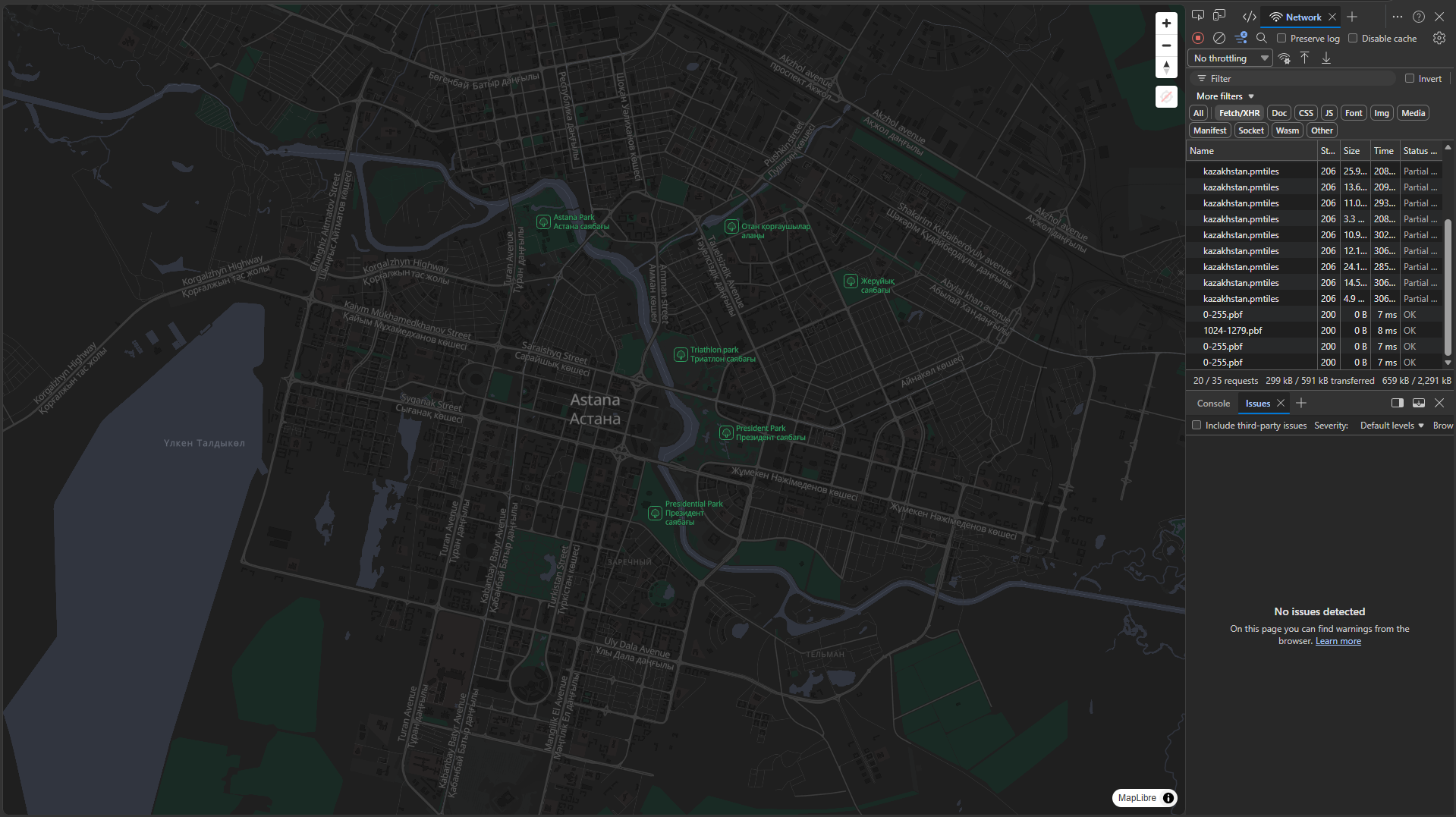
3 pointsПросто оставлю это здесь, мало ли, вдруг добавите поддержку в FGX, потому что выглядит вполне себе перспективно, а главное подключается чрезвычайно просто (но что там у неё под капотом, я без понятия, предупреждаю сразу). Возможно, все уже в курсе и один я опять отстал от жизни, но на всякий случай — теперь карту, оказывается, можно хостить одним файлом: Ну, т.е. буквально в корне сайта только индексный файл + сама карта — и больше ничего. Карта векторная, поддерживает всякие навороты (я пока подключил обе темы, светлую и тёмную, но вроде как можно кастомизировать и POI, и UI), у себя развернул так: https://protomaps.com 1️⃣ wget https://github.com/protomaps/go-pmtiles/releases/download/v1.31.2/go-pmtiles_1.31.2_Linux_x86_64.tar.gz 2️⃣ tar -xzf go-pmtiles_1.31.2_Linux_x86_64.tar.gz 3️⃣ wget -O kazakhstan.geojson https://raw.githubusercontent.com/glynnbird/countriesgeojson/master/kazakhstan.geojson 4️⃣ ./pmtiles extract https://build.protomaps.com/20260726.pmtiles kazakhstan.pmtiles --region=kazakhstan.geojson Все версии/даты/названия, разумеется, актуальны на сегодня-завтра, поэтому их лучше брать в первоисточнике: ✅ Загрузчик: https://github.com/protomaps/PMTiles ✅ Карты: https://maps.protomaps.com/builds Пример рабочего индексного файла: <!DOCTYPE html> <html lang="ru"> <head> <meta charset="utf-8" /> <meta name="viewport" content="width=device-width, initial-scale=1.0" /> <title>Карта Казахстана</title> <link rel="stylesheet" href="https://cdn.jsdelivr.net/npm/maplibre-gl@latest/dist/maplibre-gl.css" /> <style> :root { color-scheme: light dark; } *, *::before, *::after { margin: 0; padding: 0; box-sizing: border-box; } html, body { width: 100%; height: 100%; overflow: hidden; background-color: light-dark(#fff, #000); } #map { position: fixed; inset: 0; width: 100%; height: 100dvh; } .maplibregl-canvas, .maplibregl-canvas-container, #map canvas { outline: none !important; border: none !important; box-shadow: none !important; } </style> </head> <body> <div id="map"></div> <script type="module"> import { Map, NavigationControl, addProtocol } from 'https://cdn.jsdelivr.net/npm/maplibre-gl@latest/+esm'; import { Protocol } from 'https://cdn.jsdelivr.net/npm/pmtiles@latest/+esm'; import layers from 'https://cdn.jsdelivr.net/npm/protomaps-themes-base@latest/+esm'; addProtocol('pmtiles', new Protocol().tile); const createMapStyle = (themeName) => ({ version: 8, glyphs: 'https://protomaps.github.io/basemaps-assets/fonts/{fontstack}/{range}.pbf', sprite: `https://protomaps.github.io/basemaps-assets/sprites/v4/${themeName}`, sources: { 'kazakhstan_source': { type: 'vector', url: 'pmtiles://kazakhstan.pmtiles' } }, layers: layers('kazakhstan_source', themeName) }); const themeQuery = window.matchMedia('(prefers-color-scheme: dark)'); const getCurrentTheme = () => themeQuery.matches ? 'dark' : 'light'; const map = new Map({ container: 'map', style: createMapStyle(getCurrentTheme()), center: [71.430411, 51.128201], zoom: 12 }); map.addControl(new NavigationControl()); themeQuery.addEventListener('change', (e) => { const newTheme = e.matches ? 'dark' : 'light'; map.setStyle(createMapStyle(newTheme)); }); </script> </body> </html> Если открыть эту карту на 1080p в 100%, то объём сетевого трафика составит ~300 kB: В целом всё выглядит и работает как самая обычная карта: Возможно, кому-нибудь пригодится, если вдруг потребуется хостить у себя и никому не платить за доступ к карте.


 3 points
-
3 pointsСкачать: RAD Studio 12.* - 13.0 setup_1.19.3.0_release.rus.zip RAD Studio 11.* setup_11.x_1.19.3.0_release.rus.zip Дата релиза: 24 декабря 2025 Новое ✨TfgAudioRecorderДобавлен новый компонент TfgAudioRecorder, позволяющий записывать аудио сообщения с микрофона. Добавлен новый пример: "Сервисы" -> "Аудио" -> "Запись звука". TfgAudioPlayerДобавлен новый компонент TfgAudioPlayer, позволяющий воспроизводить аудио. Добавлен новый пример: "Сервисы" -> "Аудио" -> "Воспроизведение звука". Улучшения 🙌TfgAutoCompleteEditДобавлено новое свойство TfgAutoCompleteEdit.MinSearchTextLength, позволяющее изменить требуемое количество символов, необходимое для отображения списка подходящих слов подстановок. Детали. TfgTrackBarДобавлено логическое свойство IsUserInteracting, показывающее происходит ли в данный момент перемещение ползунка. Исправление ошибок 🐛FGX-418 Size Bug with derived controls. FGX-473 Error: keystore password not found (Android) FGX-480 Wrong Constant in Assets.Consts.pas FGX-484 Некорректная работа модуля TfgVirtualKeyboard на Android 15+ (Android). FGX-485 Неправильная работа метода MeasureSize для TfgButton (iOS). FGX-486 Не работает изменение режима отображения изображения под IOS в рантайме (iOS). FGX-487 Button (Contained) не использовала тему по умолчанию при старте. FGX-491 Приложение крашится при быстром нажатии на TfgDateEdit (Android). FGX-493 Некорректная работа TfgBottomSheet на Android15+ (Android). FGX-495 У TfgFrame очень сложно изменить размер. TfgSearchEdit падает при вводе текста (iOS). Задание цвет оттенка для нав бара из темы могло не применяться при старте приложения.3 points
-
2 pointsСкачать: RAD Studio 12.* - 13.0 setup_1.20.0.0_release.rus.zip Дата релиза: 15 сентября 2026 Внимание 🚨При первой сборке FGX Native приложения под Android будет скачен и установлен дистрибутив Gradle 9.6.1 со всеми вспомогательными плагинами и библиотеками, необходимыми для сборки приложений. Для этого требуется доступ к сети Интернет и время. Последующие сборки будут выполняться быстро. Из шаблона манифеста Андроид приложения был удален атрибут android:extractNativeLibs. Теперь он проставляется системой сборки автоматически. Если вы используете анимацию отображения или скрытия форм через TfgAnimationHelper, то вам необходимо убрать этот код. Теперь форма автоматически использует анимацию. Для анимации отображения модального окна нужно использовать новый метод TfgForm.ShowModal. Новое✨ФормыВ этом релизе доработаны механизмы анимации, отображения, скрытия и управления временем жизни форм. АнимацияТеперь все формы по умолчанию используют анимацию своего отображения и скрытия. В результате чего теперь не нужно прибегать к использованию вспомогательного класса анимации TfgAnimationHelper. На примере открытия формы. Было: { Обычная форма} // Открытие TfgAnimationHelper.ShowForm(Form); // Закрытие с удалением TfgAnimationHelper.HideForm(Self, [TfgAnimationOption.ReleaseControlOnFinish]); { Модальная форма } // Открытие TfgAnimationHelper.ShowModalForm(Form); // Закрытие с удалением TfgAnimationHelper.HideModalForm(Self, [TfgAnimationOption.ReleaseControlOnFinish]);Стало: { Обычная форма} // Открытие Form.Show; // Закрытие с удалением Form.Close; { Модальная форма } // Открытие Form.ShowModal; // Закрытие Form.Close;Старый метод TfgCustomForm.Show дополнен необязательным параметром APresentationStyle, позволяющим выбирать типа анимации отображения формы. На текущий момент доступно всего два варианта: TfgFormPresentationStyle.Default - с анимацией по умолчанию (как это принято на текущей платформе). TfgFormPresentationStyle.None - Не применять анимацию и отобразить форму немедленно. Поэтому если вы не хотите применять анимацию, то вам необходимо передать необязательный параметр TfgFormPresentationStyle.None в метод Show. Помимо этого метода добавлен метод для модального отображения формы ShowModal. Методы Hide и Close при скрытии/закрытии формы используют обратную анимацию, используемую при ее открытии. /// <summary> /// Отобразить форму на экране, применяя переданный стиль <c>APresentationStyle</c> анимации отображения. /// </summary> procedure Show(const APresentationStyle: TfgFormPresentationStyle = TfgFormPresentationStyle.Default); /// <summary> /// Отобразить форму модально на экране, применяя переданный стиль <c>APresentationStyle</c> анимации отображения. /// </summary> procedure ShowModal(const APresentationStyle: TfgModalFormPresentationStyle = TfgModalFormPresentationStyle.Default); /// <summary>Скрыть форму с экрана.</summary> /// <remarks>При скрытии используется обратная анимация к той, что применялась при отображении формы.</remarks> procedure Hide; overload; /// <summary>Скрыть форму с экрана без анимации.</summary> procedure HideWithoutAnimation; /// <summary>Скрыть форму с экрана с возможностью её саморазрушения инстанса.</summary> /// <remarks>На решение о действии с формой можно повлиять с помощью свойства <c>DefaultCloseAction</c> и/или события <c>OnClose</c>.</remarks> procedure Close; /// <summary>Отображается ли форма на экране.</summary> /// <remarks> /// Не учитывает ее оптическую видимость с учетом возможно перекрытия другими формами, а фиксирует факт, что она /// находится где-то на экране и ее представление встроено в сцену. /// </remarks> function IsShown: Boolean;Управление и ЗакрытиеНе смотря на то, что механизм закрытия форм уже введен давно, стоит отдельно упомянуть в свете добавления анимации о том, как корректно управлять временем жизни формы. Закрытие и скрытие формы нужно производить при помощи метода Close. При этом форма спрашивает у разработчика, что делать с формой через параметр `AAction` события OnClose. Доступны следующие варианты: TfgFormCloseAction.None - Запрос закрытия формы игнорируется. Например, если пользователь пытается закрыть форму, чтобы сохранить изменение, а заполненные данные не корректны, вы можете отменить закрытие и указать пользователю на проблему. TfgFormCloseAction.Hide - Форма скрывается, но экземпляр формы не удаляется и она может быть использована повторно. TfgFormCloseAction.Free - Форма скрывается и экземпляр формы удаляется после ее полного скрытия. Если вы заранее знаете, что форму нужно уничтожать при закрытии, вы можете указать это через свойство TfgForm.DefaultCloseAction. В этом случае, это будет значение по умолчанию, которое будет передаваться в событие OnClose, если оно определено. Этот механизм существует уже давно, однако, из-за того, что раньше закрытие формы с анимацией выполнялось через хелпер TfgAnimationHelper, не возможно было им воспользоваться так как удаление формы нужно производить только после того, как закончиться анимация. Теперь же, когда анимация является частью формы, этот механзим полностью с ней синхронизирован. Модальные формыВ этом релизе для форм добавлен асинхронный режим модальности. Чтобы отобразить форму в модальном режиме, необходимо воспользоваться новыми методами: procedure ShowModal(const APresentationStyle: TfgModalFormPresentationStyle = TfgModalFormPresentationStyle.Default); overload; procedure ShowModal(const ACloseCallback: TfgCloseModalCallback; const APresentationStyle: TfgModalFormPresentationStyle = TfgModalFormPresentationStyle.Default); overload;Форма будет отображена на экране с анимацией (по умолчанию), а результат отображения формы TModalResult будет передан в функцию обратного вызова ACloseCallback. Пример использования: MyForm.ShowModal( procedure (const AModalResult: TModalResult) begin case AModalResult of mrCancel: TfgToastFactory.Show('Cancel was pressed'); mrOk: TfgToastFactory.Show('OK was pressed'); end; end);Возвращаемое значение модального результата задается через новой свойство формы TfgForm.ModalResult. Помимо этого, теперь у кнопки TfgButton появилось публичное свойство ModalResult. При нажатии на кнопку, это значение автоматически задается в TfgForm.ModalResult. Кнопка vkHardwareBack на Android 16+Начиная с приложений, разработанных для Android 16+, Google отключила работу кнопки vkHarwareBack. Это значит, что в ваших приложениях, обработка этой кнопки не работала. Мы сэмулировали вызов нажатия этой кнопки, как было ранее. GradleОбновлена система сборки Gradle для Android приложений с версии 8.13 до 9.6.1. Внимание: При первой сборке FGX Native приложения под Android будет скачен и установлен дистрибутив Gradle 9.6.1 со всеми вспомогательными плагинами и библиотеками, необходимыми для сборки приложений. Для этого требуется доступ к сети Интернет и время. Последующие сборки будут выполняться быстро. Обновление Android библиотекВ этом релизе обновлены следующие используемые Android библиотеки до последних версий и используемые их сервисы FGX Native: Google PDF 1.0.0-10 -> 1.0.0-19 AndroidX 1.9.0 -> 1.15.0 Lottie 5.2.0 -> 6.7.1 Visio 18.1.0 -> 18.3.1 Google Maps 18.1.0 -> 20.0.0 Firebase Common 20.1.2 -> 22.0.1 Firebase Messaging 23.0.8 -> 25.1.1 Firebase Analytics 21.2.0 -> 23.2.0 Admob 21.2.0 -> 25.4.0 Facebook Login 16.2.0 -> 18.3.0 Yandex Analytics 7.5.0 -> 8.5.1 Yandex Mobile Ads 6.4.0 -> 8.3.0 Android Billing 7.0.0 -> 9.1.0 Помимо этого обновлены все заголовочные файлы Android.Api.* до последних версий библиотек. TfgCollectionViewВ 1.19.6.0 был изменен подход к расчету размера элементов списка. В результате которого, событие OnBindItem может вызываться для одного и того же элемента несколько раз. В одном случае для расчета размера элемента, в другом для его отображения. В iOS при первом отображении идет запрос размеров всех элементов. И если список предполагает отображение изображений, загружаемых асинхронно, это приводит к проблеме массовой загрузки всех изображений сразу. В результате чего, может как кончится оперативная память, отводимая под приложение, так и замедлиться все приложение в целом. Теперь же вы можете определить назначение связывания данных (вызов OnBindItem) с элементам при помощи нового свойства TfgItemWrapper.Purpose и пропустить загрузку или связывание изображений с компонентами элемента тем самым, ускорив расчет размеров элементов. /// <summary> /// <para> /// Назначение элемента в списке /// </para> /// <para> /// <list> /// <item><b>Measure</b> - Элемент используется для расчета своего размера.</item> /// <item><b>Display</b> - Элемент используется для отображения на экране.</item> /// </list> /// </para> /// </summary> TfgItemWrapperPurpose = (Measure, Display); TfgItemWrapperPurposes = set of TfgItemWrapperPurpose;Совет: Если вы используете списки с элементами с динамической высотой и отображаете изображения, то для TfgItemWrapperPurpose.Measure необходимо пропустить загрузку и отображение этих изображений в целях ускорения работы списка. Улучшения 🙌Java2DelphiУлучшена работа вспомогательной утилиты для генерации заголовочных файлов для Java/Kotlin библиотек: Если при импорте встречались два одноименных Java класса, встречающиеся в разных пакетах, то они могли неверно использоваться в качестве родительского класса. Раньше генератор не учитывал регистр имен классов, в результате чего некорректно могли обрабатываться классы package.MyClass и package.myClass. Поправлена генерация сеттеров для статических полей джава классов. Название Java метода inline является ключевым слово и обрабатывается отдельно. TfgComboBoxДобавлена возможность указать ширину выпадающего окна для TfgComboBox. Свойство имеет смысл только под Android. FGX-511 Как вычислить ширину выпадающего списка? Исправление ошибок 🐛Для TfgLabel не применялся пользовательский шрифт и горизонтальное выравнивание режиме TfgTextType.HTML. FGX-245 TfgPickerPhotoFactory не возможно выбрать фото из галереи (Android). FGX-463 TfgSwitch. При динамическом создании некорректно работает свойство TintColorName (Android). FGX-512 Yandex SDK давно не обновлялся (Android). FGX-513 Сильная просадка производительности на iOS при задействовании TfgCollectionViewStyle.VariableSize (iOS). FGX-514 Некорректное значение AVKFrame.Height на Android 15+ (Android).2 points
-
2 pointsСейчас идет параллельно работа над добавлением жеста Назад, чтобы форму можно было смахивать жестом. Вначале это будет добавлено для iOS, позже для Android 16+. Сейчас, условно, даже если вы захотите перейти к нативному поведению этой кнопки, это потребует программирование переходов между формами и тд, со всем эффектами. Так же, сужу по опыту выпуска релизов Гугла, они вначале вводят опцию для дополнительного времени для миграции ваших проектов на новое АПИ, а потом в следующей версии просто эту опцию уже отключают. Так что в любом случае нужно будет решать эту проблему, а не просто ее возвращать за счет опции.2 points
-
2 pointsВ сентябре. Сейчас работаем над добавлением жеста возврата к предыдущей форме и настроек иконок приложения для Андроида. Как закончим эти работы, можно будет делать релиз.2 points
-
2 pointsDownload: RAD Studio 12.*-13.0 setup_1.19.6.0_release.eng.zip Release date: 03 June 2026 New ✨TfgWebBrowserTwo new events have been added: OnPermissonRequest and OnConsoleMessage. Added a new demo project: "Components" -> "TfgWebBrowser" -> "Request Permissions" PermissionsThe OnPermissonRequest event allows you to control web browser access to the camera, microphone, and private media data. The event is triggered at the moment when the downloaded content in the browser wants to gain private access to the camera, microphone, or other resources. A set of requested AResources resources is passed to the event input: TfgPermissionResource = (AudioCapture, VideoCapture, ProtectedMedia); TfgPermissionResources = set of TfgPermissionResource; TfgPermissionRequestEvent = procedure(Sender: TObject; const AUrl: string; const AResources: TfgPermissionResources; const AHandler: IFGXPermissionRequestHandler) of object;The AHandler is used to confirm or reject such access. In this event, you need to make such a request to the system, and upon receiving confirmation from the user, inform the browser that access is allowed by calling AHandler.Grant(Resources). If no access is granted - AHandler.Deny. Please note that the system permissions are requested via TfgPermissionService.RequestPermissionsAsync are issued for your entire application. This means that any component and code within your application automatically gets access. However, the web browser allows you to load any content dynamically. And so that the content of the web browser cannot monitor the user (subject to previously granted access), it automatically requests such access permission from the developer through a new event. If the developer does not grant such access or does not write a handler, such an access request is automatically considered rejected. Also, this event does NOT request access to the camera or microphone from the system, but only allows you to block such access. If you approve this access at this event, but do not get permission from the system, the browser will not be able to use the camera and microphone. This event is only relevant for the Android platform. By default, iOS automatically requests such access from the user automatically. ConsoleThe OnConsoleMessage event allows you to intercept a message output by Javascript to the web browser console. It only works on Android. Improvements 🙌TfgCollectionViewThis release has changed the approach to dynamically calculating the size of TfgCollectionView elements. Despite the fact that the list allowed for changing the heights (for a vertically oriented list) of elements, the solution we proposed was not fully consistent with how the list works in iOS. As you know, the display of elements in the TfgCollectionView does not depend on their number. Because only visible elements are always displayed. Despite the fact that the working principle of the list is similar in Android and iOS, there is still a difference: In the Android, you will never know the total size of the list items (aka ContentSize) and the exact offset of the contents of the ContentOffset. To find out the exact offset of the list and the size of the content, it would have to load all the elements first in order to find out the actual height of each element. But for the speed of work in Android, this is not done. Therefore, the offset is calculated based on the average height of the elements in the visible window (the sliding window algorithm is used). This means that in Android, you can change the size of an element at any time with impunity, because this does not affect the calculation of the offset and the size of the content in the Android component's paradigm. In the iOS, the situation is completely the opposite, the list first asks for the sizes of all the elements and only then outputs them. Therefore, any change in the size of the elements after the list has requested all the sizes and performed all the heavy calculations leads to a very difficult updating of the internal state of the list with further problems in speed. Starting with iOS 26, any such attempt to resize ends up crashing the app, because the native implementation of the list does not take this into account. Therefore, we had to rethink the approach to the dynamic calculation of the heights of the elements.: If you plan to change the height of the elements dynamically, now you need to explicitly indicate this to the list by setting the value of the new TfgCollectionViewStyle.VariableSize = True property. By default, the value is set to `False`. If this is not done, the set size of the elements in the OnBindItem will be ignored and the style size taken from the designer will be used. As before, the calculation of the height of the elements must be performed in TfgCollectionView.OnBindItem. The specified height is cached in the list and used to speed up the list. When changing the size of the list, as well as when calling `ReloadItems` and other similar methods, the cache is automatically reset and you will be prompted to recalculate the sizes of the elements in TfgCollectionView.OnBindItem. If for some reason you want to recalculate the size of an element, then you need to inform the list about this by calling the methods ReloadItems, ReloadItem. If this is not done, any attempt to set a new size that differs from the original one will be ignored by the list. Let's take an example. We have a simple list with the elements displayed by the label using a single component of the style TfgLabel (text). Then an auxiliary method that calculates the height of the label at a fixed width may look like this: procedure TFormMain.AdjustHeight(const AItem: TfgItemWrapper); begin var LLabel := AItem.GetControlByLookupName<TfgLabel>('text'); if LLabel = nil then Exit; var Item := AItem.Item; // Calculating the available width of the label for text output, taking into account the external and internal margins var TotalHItemPadding := Item.Padding.LeftRtl + Item.Padding.RightRtl; var TotalHLabelMargins := LLabel.Margins.LeftRtl + LLabel.Margins.RightRtl; var TotalVLabelMargins := LLabel.Margins.Top + LLabel.Margins.Bottom; var ContentWidth := Item.Width - TotalHItemPadding - TotalHLabelMargins; // Calculating the size of the label for displaying the text, taking into account the fixed width. var Sz := LLabel.MeasureSize(TfgMeasuringSpecification.Fixed, ContentWidth, TfgMeasuringSpecification.Unspecified, 0); Item.Height := Sz.Height + TotalVLabelMargins; end;Then binding the elements to the data and setting the size will look like this: procedure TFormMain.cvListBindItem(Sender: TObject; const AIndex: Integer; const AStyle: string; const AItem: TfgItemWrapper); var ItemText: string; begin ItemText := FItems[AIndex]; var LLabel := AItem.GetControlByLookupName<TfgLabel>('text'); if LLabel <> nil then LLabel.Text := ItemText; AdjustHeight(AItem); end;Important. Don't forget to set TfgCollectionViewStyle.VariableSize = True for style. TfgNavigationBarThe appearance settings of ActionButtons were extended. The new property Icon was introduced for TfgNavigationBarButton. It allows to adjust default icon appearance on button level. It provides: RenderMode - It is responsible for whether the icon needs to be repainted in a given shade or whether the icon should be displayed as it is. TintColor/TintColorName - the color of the icon shade. Allows you to redefine the icon shade set via the TfgNavigationBar.ButtonsOptions.IconTintColor/IconTintColorName property by default. TfgLabelThe TfgLabel HTML parser has been unified across all platforms. Text display in the designer has been added for the TfgLabel.TextType = TfgTextType.HTML mode. A multi-line text editor for TfgLabel.Text has been added when editing in the object inspector. Bug Fixes 🐛Fixed data generation in info.plist to support working with UIScene. FGX-439 MoveCameraToVisibleRegion still doesn't work. FGX-474 Assets Designer. The renaming empty folder removed this folder. FGX-501 TfgCollectionView was crashed on the iOS 26+ (iOS). The exception in openning form designer in the IDE 13.1 was fixed. It requires select designer for version 13.1 in installator. In recent versions of iOS, using TfgCollectionView and TfgLabel together in TfgTextType.HTML mode could lead to crashes.2 points
-
2 pointsDownload: RAD Studio 12.*-13.0 setup_1.19.3.0_release.eng.zip RAD Studio 11.* setup_11.x_1.19.3.0_release.eng.zip Release date: 24 December 2025 New ✨TfgAudioRecorderAdded a new TfgAudioRecorder component for recording audio messages from a microphone. Added a new example: "Services" -> "Audio" -> "Sound Recording". TfgAudioPlayerAdded new component TfgAudioPlayer, which allows you to play audio. Added a new example: "Services" -> "Audio" -> "Playing sound". Improvements 🙌TfgAutoCompleteEditThe new property TfgAutoCompleteEdit.MinSearchTextLength was added. It allows to change required input chars count, what is necessary for showing popup with suggestions. Детали. TfgTrackBarAdded a boolean property IsUserInteracting indicating whether the slider is currently moving. Bug Fixes 🐛FGX-418 Size Bug with derived controls. FGX-473 Error: keystore password not found (Android). FGX-480 Wrong Constant in Assets.Consts.pas FGX-484 Incorrect work of TfgVirtualKeyboard on Android 15+ (Android). FGX-485 Incorrect work of TfgButton.MeasureSize (iOS). FGX-486 Changing Image Mode for TfgImage doesn't work in runtime (iOS). FGX-487 Button (Contained) didn't use default theme on startup. FGX-491 Application was crashed in case of fast tapping on TfgDateEdit (Android). FGX-493 TfgBottomSheet is not completely hidden on Android15+ (Android). FGX-495 It's compliated change TfgFrame size. TfgSearchEdit crashed when user was inputting text (iOS). The applying TfgNavigationBar tint color from theme didn't work.2 points
-
1 pointСкачать: RAD Studio 12.* - 13.0 setup_1.20.1.0_release.rus.zip Дата релиза: 22 сентября 2026 Внимание 🚨Если при первой сборки приложения вы сталкиваетесь с такой ошибкой: Unable to download toolchain matching the requirements ({languageVersion=21, vendor=JetBrains, implementation=vendor-specific, nativeImageCapable=false}) from 'https://api.foojay.io/disco/v3.0/ids/ed4e3bf2f5e7c5d9aabc4cbd8acd555e/redirect', due to: Could not HEAD 'https://api.foojay.io/disco/v3.0/ids/ed4e3bf2f5e7c5d9aabc4cbd8acd555e/redirect'.То скачать требуемый файл можно двумя способами: Используя VPN. Повторно выполните сборку приложения после включения VPN Если у вас нет VPN, скачайте требуемый файл по этой [ссылке](https://data.fgx-native.com/installer/jbrsdk_jcef-21.0.11-windows-x64-b1163.116.tar.gz) и скопируйте (не распаковывать) файл в каталог <Коревая папка текущего пользователя>\.gradle\jdks. После чего выполните сборку приложения. Улучшения 🙌RAD Studio 13.2Добавлена поддержка RAD Studio 13.2. При установке библиотеки необходимо выбрать версию дизайнера совместимую с 13.2 TfgControl.SizeТеперь можно получить размер компонента с учетом внешних оступов. Добавлены новые свойства для TfgControl.Size: /// <summary>Ширина компонента, включая внешний отступы слева и справа.</summary> property WidthWithMargins: Single read GetWidthWithMargins; /// <summary>Высота компонента, включая внешний отступы сверху и снизу.</summary> property HeightWithMargins: Single read GetHeightWithMargins; /// <summary>Размер компонента, включая внешние отступы.</summary> property SizeWithMargins: TSizeF read GetSizeWithMargins;Исправление ошибок 🐛Попытка отобразить форму из событие TfgForm.OnShow заканчивалась не успехом. Приложение с Firebase могло падать в 32-битной конфигурации. Это ошибка последней 25 версии Firebase. Пока проблему не устранили, откатили: Firebase Common 22.0.1 -> 21.0.0 и Firebase Messaging 25.1.1 -> 24.1.2 Для TfgLabel не применялся стиль шрифт в режиме TfgTextType.HTML (Android). Фон заданный через TfgLabel.BackgroundName мог не отображаться в дизайнере форм.1 point
-
1 point
-
1 pointПрикладываю демку и видео. Может что то я делаю не так? procedure TFormMain.fgButton1Tap(Sender: TObject); begin if TfgVirtualKeyboard.IsKeyboardShown then fgLabel1.Text:='true' else fgLabel1.Text:='false' end; 1111.zip 1234.mp41 point
-
1 pointDownload: RAD Studio 12.*-13.0 setup_1.20.0.0_release.eng.zip Release date: 03 June 2026 Warning 🚨Upon the first build of the FGX Native application for Android, the Gradle distribution 9.6.1 will be downloaded and installed with all the auxiliary plugins and libraries needed to build applications. This requires Internet access and time. Subsequent builds will run quickly. The attribute android:extractNativeLibs has been removed from the Android application manifest template. It is now automatically affixed by the assembly system automatically. If you use the animation of displaying or hiding shapes via TfgAnimationHelper, then you need to remove this code. The form now uses animation automatically. To animate the display of the modal window, you need to use the new TfgForm.ShowModal method. New ✨FormsThis release has improved the mechanisms for animating, displaying, hiding, and managing the lifetime of forms. AnimationsNow all forms use animation for their display and hiding by default. As a result, you no longer need to resort to using the auxiliary animation class TfgAnimationHelper. Using the example of opening a form. Old: { Regular form } TfgAnimationHelper.ShowForm(Form); TfgAnimationHelper.HideForm(Self, [TfgAnimationOption.ReleaseControlOnFinish]); { Modal form } TfgAnimationHelper.ShowModalForm(Form); TfgAnimationHelper.HideModalForm(Self, [TfgAnimationOption.ReleaseControlOnFinish]);New: { Regular form } Form.Show; Form.Close; { Modal form } Form.ShowModal; Form.Close;The old TfgCustomForm.Show method is supplemented with an optional APresentationStyle parameter, which allows you to select the type of animation for displaying the form. Currently, there are only two options available: TfgFormPresentationStyle.Default - with default animation (as it is accepted on the current platform). TfgFormPresentationStyle.None - Do not apply animation and display the form immediately. Therefore, if you do not want to apply animation, then you need to pass the optional parameter TfgFormPresentationStyle.None to the Show method. In addition to this method, a method ShowModal has been added for the modal display of the form. When hiding/closing a form, the Hide and Close methods use the reverse animation used when opening it. /// <summary> /// Display the form on the screen by applying the passed style <c>APresentationStyle</c> to the display animation. /// </summary> procedure Show(const APresentationStyle: TfgFormPresentationStyle = TfgFormPresentationStyle.Default); /// <summary> /// Display the form modally on the screen by applying the passed style <c>APresentationStyle</c> to the display animation. /// </summary> procedure ShowModal(const APresentationStyle: TfgModalFormPresentationStyle = TfgModalFormPresentationStyle.Default); /// <summary>Hide the form from the screen.</summary> /// <remarks>When hiding, the animation is reversed to the one that was used when displaying the form.</remarks> procedure Hide; overload; /// <summary>Hide the shape from the screen without animation.</summary> procedure HideWithoutAnimation; /// <summary>Hide the form from the screen with the possibility of its self-destruction of the instance.</summary> /// <remarks>The decision to act on the form can be influenced using the <c>DefaultCloseAction</c> property and/or the <c>onClose</c> event.</remarks> procedure Close; /// <summary>Was the form displayed on the screen?</summary> /// <remarks> /// Does not take into account its optical visibility, taking into account possible overlap with other forms, but captures the fact that it /// is located somewhere on the screen and its representation is embedded in the scene. /// </remarks> function IsShown: Boolean;Management and ClosingDespite the fact that the form closing mechanism has been introduced for a long time, it is worth mentioning separately in light of the addition of animation on how to correctly manage the lifetime of the form. The form must be closed and hidden using the Close method. In this case, the form asks the developer what to do with the form through the AAction parameter of the OnClose event. The following options are available: TfgFormCloseAction.None - The request to close the form is ignored. For example, if a user tries to close a form to save a change, and the filled-in data is incorrect, you can cancel the closing and point out the problem to the user. TfgFormCloseAction.Hide - The form is hidden, but the form instance is not deleted and it can be reused. TfgFormCloseAction.Free - The form is hidden and the form instance is deleted after it is completely hidden. If you know in advance that the form needs to be destroyed when closing, you can specify this via the TfgForm.DefaultCloseAction property. In this case, this will be the default value that will be passed to the OnClose event, if it is defined. This mechanism has been around for a long time, however, due to the fact that previously closing the form with animation was performed through the TfgAnimationHelper helper, it was not possible to use it since deleting the form only needs to be done after the animation is over. Now that animation is part of the form, this mechanism is fully synchronized with it. Modal formsIn this release, asynchronous modality mode has been added for forms. To display the form in modal mode, you need to use new methods: procedure ShowModal(const APresentationStyle: TfgModalFormPresentationStyle = TfgModalFormPresentationStyle.Default); overload; procedure ShowModal(const ACloseCallback: TfgCloseModalCallback; const APresentationStyle: TfgModalFormPresentationStyle = TfgModalFormPresentationStyle.Default); overload;The form will be displayed on the screen with animation (by default), and the result of displaying the form TModalResult will be passed to the callback function ACloseCallback. Usage example: MyForm.ShowModal( procedure (const AModalResult: TModalResult) begin case AModalResult of mrCancel: TfgToastFactory.Show('Cancel was pressed'); mrOk: TfgToastFactory.Show('OK was pressed'); end; end);The return value of the modal result is set via a new form property TfgForm.ModalResult. In addition, the TfgButton button now has a public ModalResult property. When the button is clicked, this value is automatically set in TfgForm.ModalResult. vkHardwareBack key on Android 16+Starting with applications developed for Android 16+, Google disabled operation of the vkHarwareBack button. This means that in your applications, the processing of this button did not work. We simulated the challenge of pressing this button, as it was before. GradleWe updated the Gradle build system for Android applications from version 8.13 up to 9.6.1. Attention: During the first build of the FGX Native application for Android, the Gradle 9.6.1 distribution will be downloaded and installed with all the auxiliary plugins nd libraries needed to build applications. This requires Internet access and time. Subsequent builds will run quickly. Upgrading used Android librariesIn this release, the following used Android libraries have been updated to the latest versions and their FGX Native services have been used: Google PDF 1.0.0-10 -> 1.0.0-19 AndroidX 1.9.0 -> 1.15.0 Lottie 5.2.0 -> 6.7.1 Visio 18.1.0 -> 18.3.1 Google Maps 18.1.0 -> 20.0.0 Firebase Common 20.1.2 -> 22.0.1 Firebase Messaging 23.0.8 -> 25.1.1 Firebase Analytics 21.2.0 -> 23.2.0 Admob 21.2.0 -> 25.4.0 Facebook Login 16.2.0 -> 18.3.0 Yandex Analytics 7.5.0 -> 8.5.1 Yandex Mobile Ads 6.4.0 -> 8.3.0 Android Billing 7.0.0 -> 9.1.0 In addition, all header files Android.Api.* have been updated to the latest library versions. Improvements 🙌TfgCollectionViewIn 1.19.6.0 the approach to calculating the size of list items has been changed. As a result, the OnBindItem event can be called for the same element multiple times. In one case, to calculate the size of the element, in the other to display it. In iOS, the first time it is displayed, the size of all elements is requested. And if the list assumes the display of images loaded asynchronously, this leads to the problem of loading all images at once en masse. As a result, the RAM allocated for the application may run out, and the entire application may slow down. Now you can determinate the data binding assignment (call OnBindItem) to the elements using the new TfgItemWrapper.Purpose property and skip loading or linking images to the components of the element, thereby speeding up the calculation of the size of the elements. /// <summary> /// <para> /// Assignment of an item in the list /// </para> /// <para> /// <list> /// <item><b>Measure</b> - The item is used to calculate its size.</item> /// <item><b>Display</b> - The item is used to display on the screen.</item> /// </list> /// </para> /// </summary> TfgItemWrapperPurpose = (Measure, Display); TfgItemWrapperPurposes = set of TfgItemWrapperPurpose;Tip: If you are using lists with dynamic height elements and displaying images, then use TfgItemWrapperPurpose.Measure to skip loading and displaying these images in order to speed up the list. Java2DelphiImproved the auxiliary utility for generating header files for Java/Kotlin libraries: If two Java classes with the same names were found in different packages during import, they could be incorrectly used as a parent class. Previously, the generator did not take into account the case of class names, as a result of which the classes package.MyClass and package.MyClass could be handled incorrectly. Fixed the generation of setters for static java class fields. The name of the Java method inline is a keyword and is processed separately. TfgComboBoxAdded the ability to specify the width of the drop-down window for the TfgComboBox. The property TfgComboBox.Appearance.Popup.Width only makes sense under Android. FGX-511 How can I calculate the width of the drop-down list? Bug Fixes 🐛TfgLabel didn't apply custom user's font and horizontal text alignment. FGX-245 TfgPickerPhotoFactory doesn't let to select a photo from the gallery (Android). FGX-463 The TintColorName property does not work correctly during dynamic creation TfgSwitch. (Android). FGX-512 The Yandex SDK has not been updated for a long time (Android). FGX-513 Severe performance drawdown on iOS when using TfgCollectionViewStyle.VariableSize (iOS). FGX-514 Invalid AVKFrame Height on Android 15+ (Android).1 point
-
1 pointHello Yaroslav, thank you, that was it. After reinstalling FGX Native 1.20.1.0 with the iOS targets selected, the library path for iOS Simulator ARM64 now contains $(FGX)\Libs\370\iOSSimARM64\Release, and both a sample and our app build and link for iOSSimARM64 again (error F1027 for FGX.Consts is gone). One observation that may help other users: the installed files were byte-identical to the previous installation — only the IDE library path for the simulator platform was missing. It seems the installer only writes that path when the iOS targets are checked, so a hint in the installer or in the release notes could save others some time. Best regards, Stefan1 point
-
1 point
-
1 pointDownload: RAD Studio 12.*-13.0 setup_1.20.1.0_release.eng.zip Release date: 22 September 2026 Improvements 🙌RAD Studio 13.2Added support for RAD Studio 13.2. When installing the library, you have to select the designer version compatible with 13.2 TfgControl.SizeNow you can get control size with margins. New properties were added for TfgControl.Size: /// <summary>Control's width with left and right margins.</summary> property WidthWithMargins: Single read GetWidthWithMargins; /// <summary>Control's height with top and bottom margins.</summary> property HeightWithMargins: Single read GetHeightWithMargins; /// <summary>Control size with margins.</summary> property SizeWithMargins: TSizeF read GetSizeWithMargins;Bug Fixes 🐛An attempt to display a form from the TfgForm.OnShow event did not end with success. An application with Firebase could crash in a 32-bit configuration. This is a bug of the latest version 25 of Firebase. Until the problem is fixed, we rolled back: Firebase Common 22.0.1 -> 21.0.0 and Firebase Messaging 25.1.1 -> 24.1.2 The font style was not applied to TfgLabel in TfgTextType.HTML mode (Android). The background set via `TfgLabel.BackgroundName` might not be displayed in the form designer.1 point
-
1 pointУдалил содержимое .gradle, загрузил и распаковал gradle 9.6.1 руками, после чего проект собрался. Спасибо за подсказку.1 point
-
1 point
-
1 pointКогда выйдет следующая версия? В честь круглого количества (1024) пользователей сайта нужно срочно выпустить новую версию1 point
-
1 pointДобрый вечер, Данную проблему устранили в будущей версии. Временно, нужно представить цвет в виде ARGB, а не RGB. Для локального исправления, нужно добавить FF к коду цвета в начало. #FFE91E63 Для справки. В 1.19.6.0 мы написали свой кроссплатформенный парсер HTML, чтобы везде (включая дизайнер) рендерился HTML текст и исправить проблему с псевдоасинхронным нативном разбором HTML в TfgCollectionView.1 point
-
Hello Yaroslav, would be nice to have the swipe on TfgCollectionView. At momemt I manage delete item with long tap and popup dialog to confirm. Kind Regards Andrea1 point
-
Роман, большое спасибо за отличное решение! 🙏1 point
-
можно использовать TfgPaintBox для отображения просто изображения без временных файлов1 point
-
OpenDialog - iOS, Android OpenDialog_iOS+Android.zip IMG_1282.MP41 point
-
1 point
-
1 pointСкачать: RAD Studio 12.* - 13.0 setup_1.19.4.0_release.rus.zip Дата релиза: 13 февраля 2026 Новое ✨TfgSegmentДобавлен новый компонент TfgSegment для отображения сегмента круга/эллипса. FGX-481 Добавить фигуру сегмент круга. Улучшения 🙌SVGДобавлена поддержка задания цвета по умолчанию для всего SVG документа для заливки и кисти контуров. Теперь можно задавать цвет через атрибуты fill и stroke у корневого элемента <svg>: <svg xmlns="http://www.w3.org/2000/svg" height="40px" viewBox="0 -960 960 960" width="40px" fill="#5D0E07" stroke="#112233">Не корректная иконка уведомлений при любых настройках. ПрочееДобавлен пример, показывающий автоматический расчет высоты элементов списка на основании отображаемого текста в элементе: "Компоненты" -> "TfgCollectionView" -> "Автоматический расчет высоты элемента" FGX-482 Добавить пример с использованием TfgCollectionView. Исправление ошибок 🐛FGX-496 fgScratchOverlay при добавлении на форму вызывает краш среды. FGX-497 Не работает PhoneDialer на IOS (iOS). FGX-498 Некорректное отображение размера кнопки (iOS). FGX-479 Assets Designer Созданный ресурс появляется за границей окна. FGX-488 Ошибка Access Violation при закрытии проекта в IDE. Использование вместе TfgAudioPlayer, TfgCamera, TfgAudioRecorder приводило к ошибке.1 point
-
1 pointDownload: RAD Studio 12.*-13.0 setup_1.19.4.0_release.eng.zip Release date: 13 February 2026 New ✨TfgSegmentThe new component TfgSegment was added. It allows to display circle/ellipse segment. FGX-481 Add new figure circle segment. Improvements 🙌SVGAdded support for setting the default color for the entire SVG document for fill and stroke brush. Now you can set the color using the fill and stroke attributes of the root element <svg>: <svg xmlns="http://www.w3.org/2000/svg" height="40px" viewBox="0 -960 960 960" width="40px" fill="#5D0E07" stroke="#112233">Incorrect push notificatio icon on ay settings. OtherThe sample was added for demonstrating automatical caluclation height of item based on text size: "Component" -> "TfgCollectionView" -> "Automatic calculation of the height of the elements" FGX-482 Add sample about usage TfgCollectionView. Bug Fixes 🐛FGX-496 fgScratchOverlay causes the environment to crash when added to a form. FGX-497 PhoneDialer doesn't work on iOS (iOS). FGX-498 Incorrect display button size (iOS). FGX-479 Assets Designer. Just created asset is displayed out of viewport. FGX-488 Access Violation is raised in the IDE closing. The using TfgAudioPlayer, TfgCamera and TfgAudioRecorder together led to exception.1 point
-
1 pointВот такое предупреждение увидел от Win11. После того, как разрешил "Доступ к контролируемым файлам" установка продолжилась без проблем.
 1 point
-
Всем привет! Для инфо В моем приложении используется TLocationService А из-за него посчитали что необходимо выполнять и требования ниже. Для того чтобы запросить эти права необходимо добавить ключ, Я его добавил так Далее для того чтобы вызвать запрос этих прав в приложении соорудили файл (во вложении, TrackingManagerUnit.pas) В нужном месте вызываем: TATTrackingManager.OCClass.requestTrackingAuthorizationWithCompletionHandler(ATTrackingCallback); в колбэк вернется ответ, который можно обработать TrackingManagerUnit.pas

 1 point
-
0 points