Viktor Akselrod
Administrators
-
Joined
-
Last visited
Everything posted by Viktor Akselrod
-
I have reproduced the problem. Thanks for the report.
-
Fixed 1.9.3.0.
-
Hello. There is currently no cross platform method to display PDF using FGX Please check this thread , it can help you. Thank you.
-
Hello. 1) Which version of Delphi are you using? 2) Please attach a call stack from IDE. 3) What happens in the ReturnOkCodigo? Thank you.
-
Hello. Thanks to all! Regards.
-
Здравствуйте. На всякий случай: HitTest=True ?
-
Исправлено в 1.9.2.0.
-
Fixed in 1.9.0.0.
-
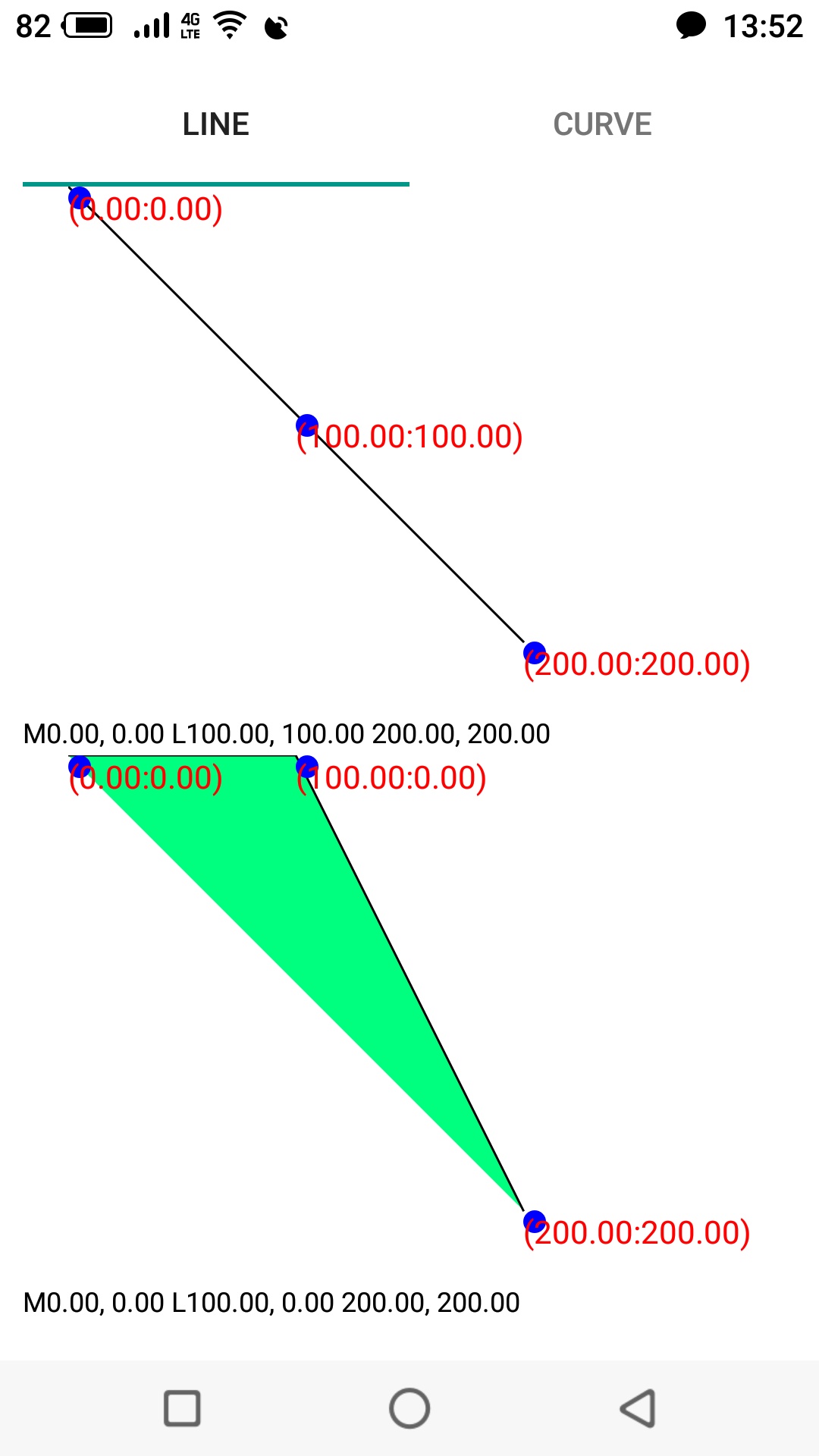
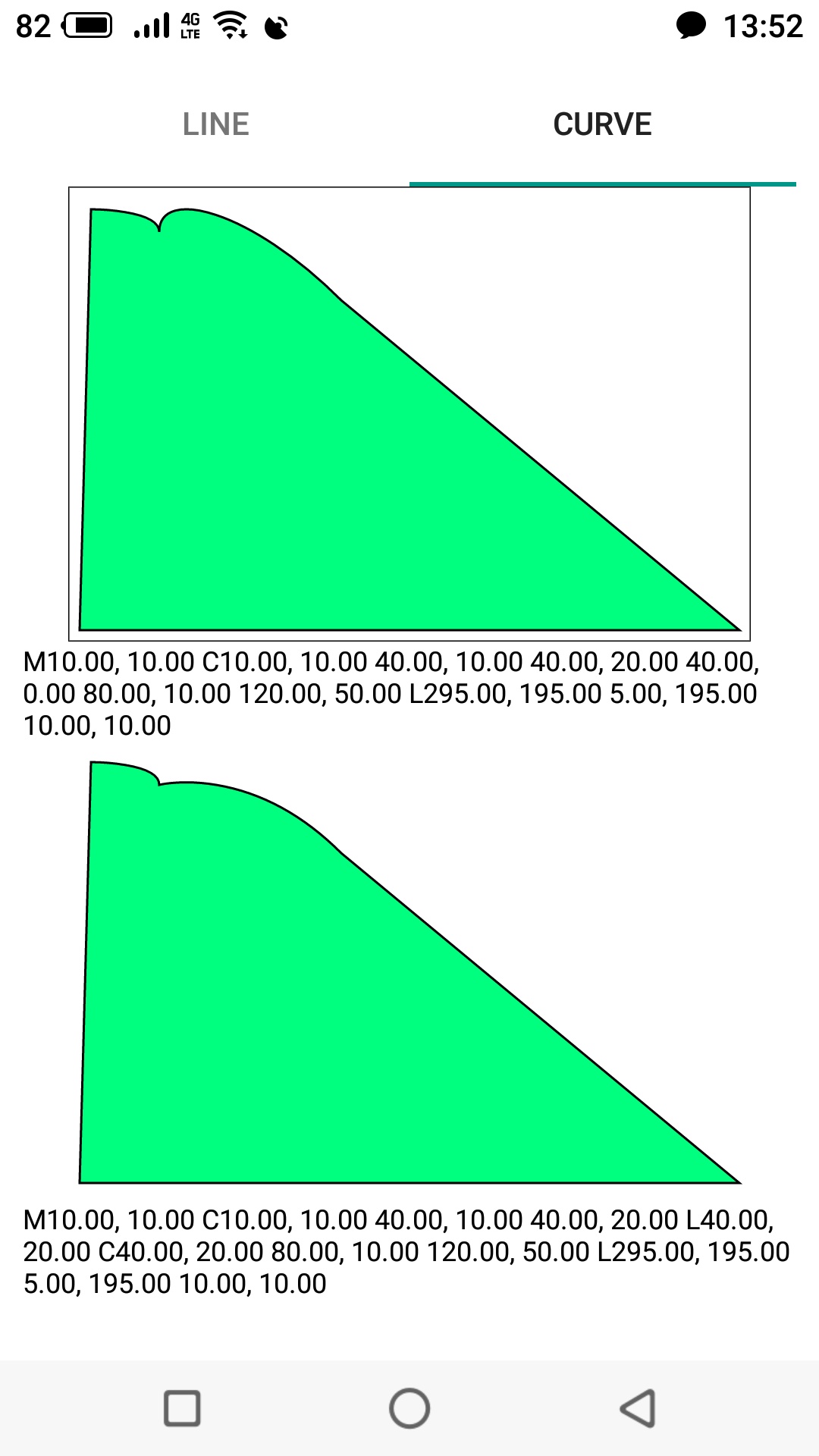
Hello, Michal. M0,0 L100,100 200,200 is one diagonal line, nothing is visually clear. M0.0 L100.0 200,200 will be much clearer - here you will see a triangle. This happens because when two bezier curves go in a row, the first control point is taken not from the "pen position", but more details (command "S") In order not to break the path and start drawing a second bezier curve from the "pen position" you can replace MoveTo with LineTo. path:=TfgPath.Create; path.MoveTo(10,10); path.AddSmoothCurve(PointF(40,10),PointF(40,20)); path.LineTo(40,20); // !!! path.AddSmoothCurve(PointF(80,10),PointF(120,50)); Result (bottom image): Thank you.


-
Hello, Michal. The fill is applied to closed subpaths. The command MoveTo interrupts the current subpath and the next command starts a new subpath. Please, try to remove all MoveTo commands and check the result. In most cases, it makes no sense to use the MoveTo command explicitly, since the pen will be at the end point of the last command. Thank you.
-
Исправлено в 1.8.0.0
-
Спасибо за уточнение.
-
Исправлено в 1.8.0.0.
-
Здравствуйте. Подтверждаю проблему. Постараемся исправить в ближайшее время. PS строки Bitmap.Canvas.EndPaint; и Bitmap.SaveToFile(filename); надо как минимум поменять местами PPS try finally поставить между конструктором и деструктором для надежности.
-
Имелось ввиду, что управление маркерами пока не реализовано через объект TfgMapMarker.
-
Hello. We expect a version 1.6.0.0 today. Thank you.
-
Fixed in 1.6.0.0.
-
Hello. This feature has not been implemented. We are working on it. Thank you.
-
Здравствуйте. Приложите, пожалуйста, минимальное демо, демонстрирующее проблему. Спасибо.
-
Здравствуйте. Спасибо за пример. В ближайшее время проверим эту проблему.
-
Здравствуйте. Необходим демо проект, чтобы можно было быстрее ответить на ваш вопрос. Спасибо.
-
Fixed in 1.6.0.0.
-
Спасибо. Проверим в ближайшее время.
-
Hello. This is bug. We are working on it. Thank you.
-
Здравствуйте. Прикрепите, пожалуйста, минимальное демо, показывающее проблему. Спасибо.